House Design 3D - Home Planner
Digital Grace AppHouse & Home
3.596.00 Reviews
- Version
- 2.8.1
- Installs
- 1.00M
- Age Rating
- Everyone
Screenshots

Our Review of House Design 3D - Home Planner
 Analysis by Appyee
Hey there, fellow home design enthusiasts! Have you ever dreamt of creating your perfect living space without lifting a hammer or painting a wall? Well, I’ve got some exciting news for you. Let me introduce you to an app that’s making waves in the world of interior design – House Design 3D - Home Planner. I’ve taken the liberty of diving deep into its features, and I’m here to give you the lowdown on everything it offers. Grab a cup of coffee, and let’s get designing!
Getting Started: A Seamless Setup
First things first, getting started with House Design 3D - Home Planner is as easy as pie. You can download it from either the Android or iOS app store. It’s a breeze to install, and you’ll be designing in no time. As soon as you open the app, you’re greeted with a user-friendly interface that’s both intuitive and visually appealing. Even if you’re not a tech whiz, you’ll find your way around effortlessly.
Features That Will Make You Go Wow
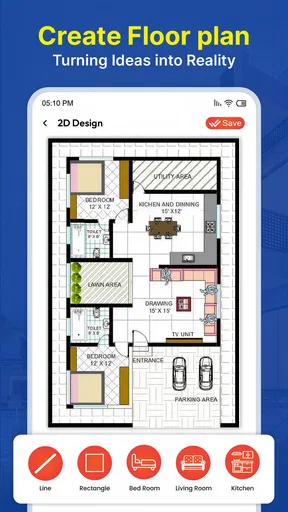
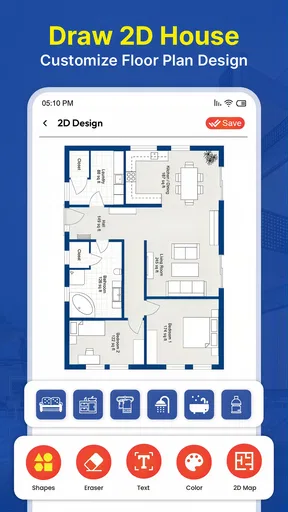
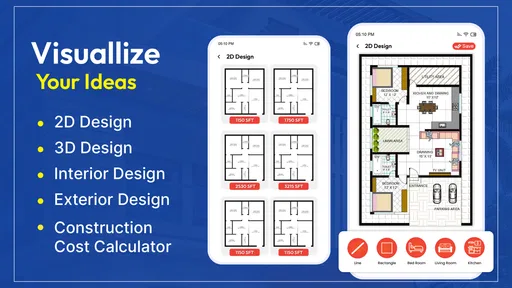
Alright, let’s talk features because this app is packed with them! Whether you’re a seasoned interior designer or just a curious newbie, there’s something here for everyone. One of the standout features is the 3D modeling capability. You can create a floor plan from scratch or modify existing templates. The drag-and-drop functionality makes it super easy to add furniture, change wall colors, and even switch up the flooring. It’s like having a mini design studio in your pocket.
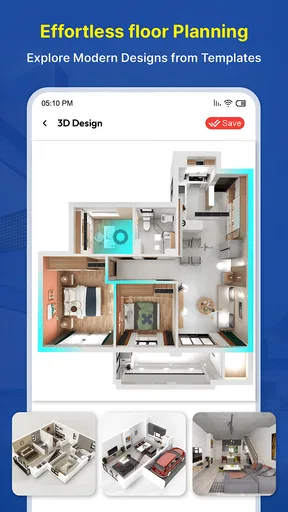
Another cool feature is the ability to visualize your designs in 3D. You can switch between 2D and 3D views with just a tap, giving you a realistic sense of how your space will look. Trust me, seeing your design come to life in 3D is incredibly satisfying!
Designing with Precision
If you’re detail-oriented like me, you’ll appreciate the precision tools available in the app. You can adjust dimensions to the nearest centimeter and ensure everything fits perfectly. It’s like having a digital measuring tape that never fails. Plus, the app allows you to save multiple projects, so you can work on different rooms or spaces simultaneously.
The Social Touch
The app also encourages a sense of community among its users. You can share your designs with friends or other users for feedback. It’s a great way to gain inspiration and see what others are creating. Plus, who doesn’t love a little friendly competition when it comes to creative design?
Some Handy Tips
- Take advantage of the tutorials available in the app. They’re helpful for getting the most out of all the features.
- Don’t be afraid to experiment. The app is forgiving, and you can undo changes if you’re not happy with them.
- Explore the extensive furniture catalog. You’ll find a wide range of styles to suit your taste.
Final Thoughts
So, is House Design 3D - Home Planner worth your time? In my humble opinion, absolutely! It’s a fantastic tool for anyone interested in home design, offering both versatility and ease of use. Whether you’re planning a major renovation or just dreaming up your ideal space, this app has you covered. It’s like having a personal interior designer right on your phone. So go ahead, unleash your creativity, and start designing your dream home today!
Remember, the best designs come from the heart, so have fun and make your space truly yours. Happy designing!
Verdict
Strengths of House Design 3D - Home Planner
- Intuitive drag-and-drop interface.
- Wide variety of furniture and decor.,3D view for realistic visualization.
- Offline mode available for planning.
- Cross-platform synchronization.
Limitations of House Design 3D - Home Planner
- Limited free features available.
- Occasional app crashes reported.
- In-app purchases can be costly.
- Some features require internet.
- Not all objects are customizable.
Similar Picks in This Category
View All
Universal TV Remote Control
CodeMatics Media Solutions3.9

AlfredCamera Home Security app
Alfred Systems Inc.4.7

Planner 5D: AI Home Design
Planner 5D4.5

Universal Tv Remote-Cast to TV
One Music Player4.1

Zillow: Homes for Sale & Rent
Zillow Group4.8

99acres Buy/Rent/Sell Property
infoedge.com4.3
Frequently Asked Questions
What features does House Design 3D - Home Planner offer?
House Design 3D offers a comprehensive set of features for designing and remodeling your home. Users can create floor plans, customize layouts, and furnish interiors with a vast library of furniture and decor. It also allows for 3D visualization, enabling users to see their designs in a realistic manner. Additionally, the app supports both 2D and 3D editing modes.
Is House Design 3D suitable for beginners in home design?
Yes, House Design 3D is designed to be user-friendly for both novices and professionals. The intuitive interface guides users through the design process with easy-to-use tools. Tutorials and tips are available to help beginners get started, ensuring a smooth experience from the first project.
Can I share my designs with others using House Design 3D?
Absolutely! House Design 3D allows users to export their designs and share them via email or social media. The app supports various file formats, making it easy to collaborate with others or receive feedback on your projects. This feature is especially useful for professionals working with clients.
Does House Design 3D require an internet connection to function?
House Design 3D primarily functions offline, allowing users to work on their projects without needing an internet connection. However, some features, such as downloading additional content or sharing designs online, require internet access. This flexibility makes it ideal for users who prefer to work without constant connectivity.
Are there any in-app purchases in House Design 3D?
While House Design 3D offers a robust free version, it includes optional in-app purchases for additional features and content. Users can purchase expansion packs that provide more furniture, textures, and design options. These purchases enhance the app's capabilities but are not necessary for standard use.
